Landing in the United States without mobile data is a quick recipe for travel stress. Whether you need Google Maps to exit Miami International Airport, an Uber in New York City, or instant access to your hotel booking confirmation, having a fast and reliable eSIM USA setup is essential before you board your flight.
Instead of paying exorbitant daily roaming fees to your home carrier or standing in line at airport kiosks for expensive physical SIM cards, digital travel eSIMs allow you to connect instantly to top-tier US cellular networks. This comprehensive 2026 master guide covers everything you need to know: US network coverage, phone compatibility checks, provider comparisons (Holafly vs Airalo vs Nomad), installation guides, and troubleshooting tips.
📍 What You Will Learn in This Guide:
- US Network Infrastructure: Understanding AT&T vs T-Mobile vs Verizon coverage.
- Top eSIM USA Comparison: Holafly vs Airalo vs Nomad (Rates, Data Limits, Hotspot).
- Phone Compatibility Check: How to check if your phone is eSIM-ready and unlocked.
- Step-by-Step Activation Guide: Setup instructions for iPhone and Android.
- Troubleshooting & APN Fixes: What to do if you have no service upon landing.
- City-Specific Guides: Dedicated 5G coverage guides for 12 major US cities.
1. Understanding US Cellular Networks (AT&T, T-Mobile, Verizon)
When buying a travel eSIM, you aren’t just buying a plan—you are connecting to underlying major American telecom carriers. In the USA, three giant infrastructure networks dominate coverage:
🔵 AT&T Network
Best for: National coverage, rural areas, highways, and National Parks. AT&T has massive geographic reach across North America, making it ideal for road trips.
🩷 T-Mobile Network
Best for: Ultra-fast 5G speeds in major metropolitan areas, airports, and urban hubs. T-Mobile leads the US in high-speed mid-band 5G deployment.
🔴 Verizon Wireless
Best for: Overall network reliability across remote towns and business centers. Very strong network density across the Midwest and East Coast.
2. Top 3 eSIM Providers for USA Travel in 2026
We tested the leading international eSIM providers based on price, data throughput, network stability, and customer care. Here is the deep breakdown of each choice:
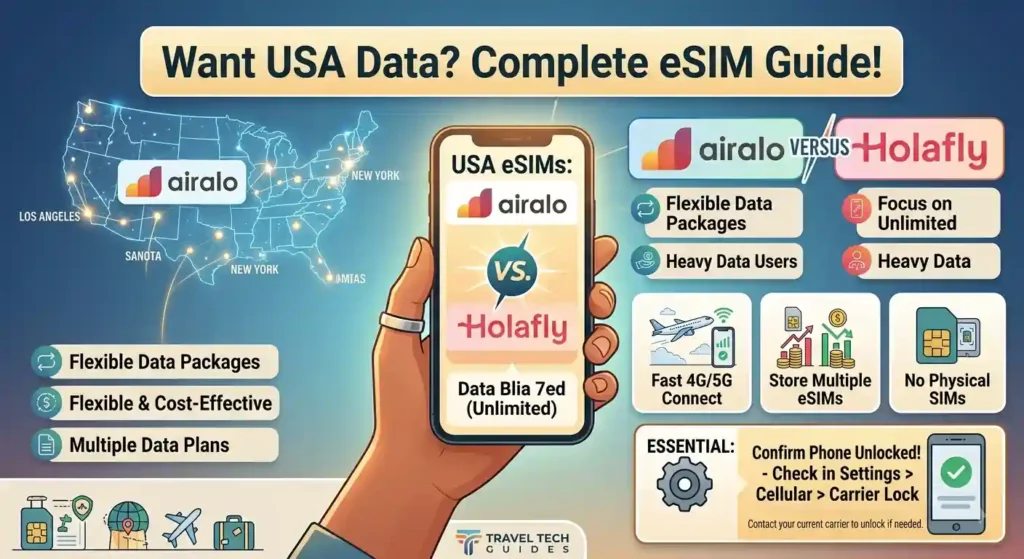
1. Holafly USA eSIM
🏆 Best Overall for Unlimited Data
Holafly is the industry leader for travelers who want zero data limits. Connecting dynamically to both AT&T and T-Mobile networks, Holafly guarantees that you stay connected to whichever tower offers the strongest 5G signal nearby.
- Data Allowance: 100% Truly Unlimited 5G/LTE Data.
- Hotspot / Tethering: Includes up to 500MB/day hotspot sharing.
- Backup Safety Net: Always-On 1GB monthly emergency data buffer included.
- Customer Support: 24/7 Live WhatsApp & Email support in 10+ languages.
👉 Get Unlimited Data with Holafly USA
Instant QR Code delivery via email • 100% Refund Guarantee
2. Airalo (Change USA eSIM)
🥈 Best Budget Pick for Light Data
Airalo is ideal for budget-conscious travelers who know their data consumption habits. Operating on T-Mobile’s 5G network, Airalo provides fixed prepaid buckets (e.g., 1GB, 3GB, 5GB, 10GB, 20GB) managed easily via their iOS/Android mobile app.
- Data Allowance: Fixed Data Packages (1GB to 20GB).
- Hotspot / Tethering: Fully supported (uses your purchased data package).
- Top-Up Feature: Easy one-click data top-up directly inside the app.
3. Nomad eSIM USA
🥉 Best Mid-Tier Flexible Plans
Nomad bridges the gap between fixed plans and heavy usage. Connecting to AT&T and Verizon, Nomad provides clean pricing tiers with flexible validity periods ranging from 7 to 30 days.
📊 Quick Comparison: Holafly vs Airalo vs Nomad
3. Phone Compatibility & Carrier Lock Check (Crucial)
Before purchasing any digital travel eSIM, your smartphone must pass two mandatory technical requirements:
- Hardware Compatibility: Your phone must have an embedded SIM chip built into its motherboard.
- Carrier Status: Your phone must be 100% CARRIER UNLOCKED by your local network operator.
🔍 How to Check if Your Phone is Unlocked Right Now
On Apple iPhone (iOS 14 or newer):
Go to Settings > General > About → Scroll down to Carrier Lock. If it says “No SIM restrictions”, your iPhone is ready for travel eSIMs. If it says “SIM locked”, contact your local provider to unlock it before departure.
On Android Devices (Samsung, Google Pixel, Xiaomi):
Go to Settings > Connections / Network & Internet > Mobile Networks. If you see an option for “Add eSIM” or “Sim Card Manager”, your phone supports digital SIMs. You can also dial *#06# on your keypad—if an EID number appears on your screen, your device supports eSIM!
Popular Compatible Devices:
- Apple: iPhone XS, XR, 11, 12, 13, 14, 15, 16, 17 series & iPhone SE (2nd/3rd gen). Note: US-purchased iPhone 14s and newer do not have physical SIM slots at all.
- Samsung: Galaxy S20, S21, S22, S23, S24, S25, S26 series, Note 20, Z Fold (all generations), Z Flip (all generations).
- Google Pixel: Pixel 3, 4, 5, 6, 7, 8, 9 series and newer.
4. Step-by-Step eSIM USA Activation & Setup
✈️ Phase 1: Pre-Departure Setup (Do This at Home)
Complete these steps 1–2 days before your departure flight while connected to stable home Wi-Fi:
🛬 Phase 2: On Arrival Activation (Do This When Plane Lands)
As soon as your plane touches down at a US airport:
- Turn OFF Data Roaming on your primary home SIM (to prevent expensive home roaming charges).
- Turn ON your secondary “US Travel” eSIM line.
- Enable Data Roaming ON for your travel eSIM profile.
- Wait 1–3 minutes for the device to handshake with local AT&T or T-Mobile towers. Enjoy instant high-speed internet!
5. Troubleshooting: What if Your eSIM Has No Service?
If your smartphone displays “No Service” or fails to load pages after landing in the USA, follow these instant diagnostic fixes:
Fix 1: Toggle Data Roaming ON
Travel eSIMs work via roaming agreements with local US providers. If “Data Roaming” is switched off under your travel eSIM cellular profile, internet connection will fail completely.
Fix 2: Airplane Mode Reset
Turn Airplane Mode ON for 30 seconds and switch it OFF. This forces your mobile phone modem to clear temporary tower cache and search for nearest 5G signals.
Fix 3: Manual Network Selection
Go to Settings > Cellular > Network Selection → Turn OFF Automatic. Wait for the list of available networks to load, then manually select AT&T or T-Mobile.
Frequently Asked Questions (FAQ)
Can I keep my WhatsApp number active with a travel eSIM?
Yes! WhatsApp is tied to your account credentials, not your data SIM. When you open WhatsApp on arrival, click “Keep Existing Number” when prompted. All your chat history and phone numbers remain identical.
Will an eSIM USA give me a local US phone number?
Most standard international travel eSIMs (like Holafly and Airalo) are data-only profiles. You will not get a traditional phone number for SMS or voice calls, but you can make unlimited calls using WhatsApp, FaceTime, Skype, or Google Meet.
Can I share my internet hotspot connection with my laptop?
Airalo and Nomad allow full tethering up to your plan’s total data limit. Holafly allows hotspot sharing up to 500MB per day, which is sufficient for light laptop browsing or tablet connection.
🇺🇸 City-Specific eSIM Travel Guides
Heading to a specific American metropolis or planning a multi-state road trip? Select your destination below for localized 5G coverage maps, airport activation steps, and local connectivity tips:
🌴 Miami, Florida
MIA airport activation, South Beach 5G coverage & Florida Keys setup.
Explore Specialized Comparison & Hardware Guides
Looking for deep-dive provider battles or technical hardware checks? Explore our specialized articles:
- ⚔️ Head-to-Head Provider Comparison: Holafly eSIM USA vs Airalo: Which One Should You Choose?
- 📱 Technical Hardware Check: How to Check if Your Smartphone is Unlocked Before Traveling
- ✈️ Travel Tips: Top 5 Reasons to Avoid Airport Physical SIM Kiosks

Mohamed Kacha is a digital entrepreneur and tech writer specializing in international mobile connectivity and travel tech. With hands-on experience navigating roaming challenges and testing global eSIM solutions, Mohamed is dedicated to helping travelers stay connected seamlessly without breaking the bank